





Frequently Asked Questions
Tap2Local™ is a convenient and secure solution that allows Peoples Bank Business Checking Account holders and sole proprietors to accept card payments directly through our Peoples Bank Mobile Banking app, eliminating the need for extra hardware.
Explore these common questions to learn more about how the service works and what it costs.
How do I accept payments in Tap2Local™?
Tap2Local™ supports Tap To Pay for in-person transactions and offers payment links and QR codes for remote or contactless payments allowing you to accept payments both in-person and remotely!
Once enrolled, our Peoples Bank Mobile Banking app transforms your smartphone into a contactless Point-of-Sale (POS) device, allowing you to accept payments from debit cards, credit cards, Apple Pay, Google Pay, and more.
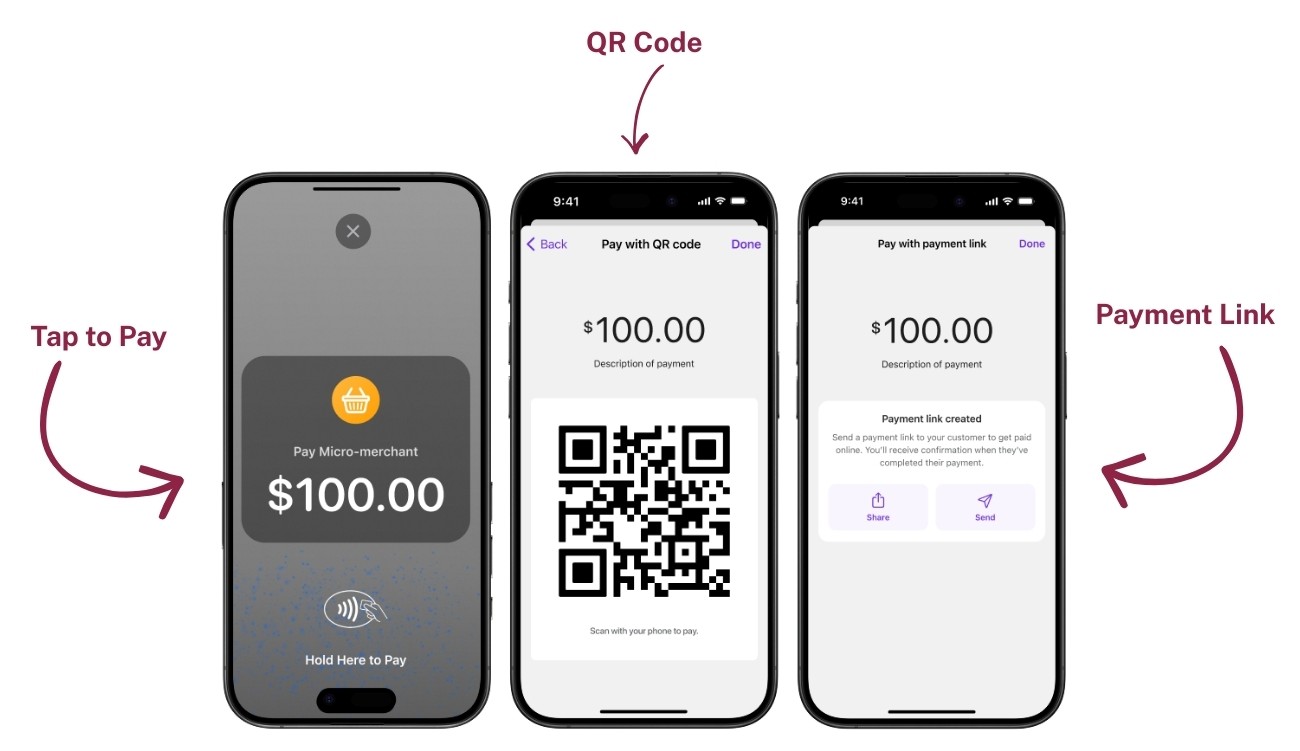
Tap to Pay
To accept a card-present payment:
- Tap Accept Payment or the Merchant option in your Peoples Bank Mobile Banking app.
- Enter the payment amount, add a description, and tap Continue.
- Select Tap to Pay on iPhone/Tap to Pay on Android to receive payment in person.
- Have the customer tap their physical or mobile card on your compatible smartphone device.
- A payment complete screen appears once the payment has processed successfully. Tap Email receipt if the customer wishes to receive a receipt for the transaction.
QR Code
To accept a payment using a QR code:
- Tap Accept Payment or the Merchant option in your Peoples Bank Mobile Banking app.
- Enter the payment amount, add a description, and tap Continue.
- Select QR code to generate a shareable QR code the customer can use to make their payment.
-
The customer can scan the code (either in-person or from an online display) to instantly complete their payment.
Payment Link
To facilitate online or remote payment:
- Tap Accept Payment or the Merchant option in your Peoples Bank Mobile Banking app.
- Enter the payment amount, add a description, and tap Continue.
- Select Payment link to share an online payment link the customer can use to make their payment online.
- Send the link to your customer (via email, text, etc.) to complete the online payment.
How do I view transactions in Merchant Overview?
The merchant overview feature provides a real-time snapshot of your business activity. To review transactions:
- Go to your Peoples Bank Mobile Banking app menu and tap Merchant.
- The merchant overview allows you to view revenue, review a detailed history of all transactions processed, and initiate a new payment transaction.
- To review a specific transaction, locate it in the history and tap it to open the Payment detail.
How do I create refunds?
In the event that a partial or full refund is necessary:
- Go to your Peoples Bank Mobile Banking app menu and tap Merchant.
- Locate the transaction in the history and tap to review.
- Tap Create refund.
- Use the toggle to select full refund or partial refund, and tap Submit. Once the refund has been processed, a notation will appear in the merchant overview and the payment detail for the transaction.
How do I manage customer disputes?
Merchants can manage customer disputes directly in your Peoples Bank Mobile Banking app by either accepting liability or submitting evidence against the dispute.
- From the Merchant overview, click the menu on the right side of the screen (the circle with three ellipses) and tap Disputes.
- A list of active and completed disputes displays.
- Tap on the transaction in question to view more details.
- Based on your financial institutions policies and procedures, select either Accept dispute or Submit evidence.
Are Tap2Local™ fees lower than Square®?
Often, yes. Jack Henry offers competitive, transparent processing rates that are frequently lower than Square® and other third-party payment tools.
Do I need a Peoples Bank Business Checking Account to enroll?
Yes. An active Peoples Bank Business Checking Account is required to activate Tap2Local™.
What kind of phone or device do I need?
You’ll need a compatible smartphone that supports Tap to Pay functionality. Our Digital Banking team can confirm device compatibility during enrollment.
Is Tap2Local™ secure?
Absolutely! Tap2Local™ uses a secure, PCI-compliant payment infrastructure provided by Jack Henry to protect your transactions and customer data.
Tap2Local™ is provided in partnership with and is a trademark of Jack Henry & Associates, Inc. Moov partners with Jack Henry & Associates to offer Tap2Local™ to financial institutions and their business users. Fees, terms, and eligibility are subject to change. Payment processing fees are established by Jack Henry at the time of enrollment. Service requires an active Peoples Bank Business Checking Account and a compatible mobile device. Tap to Pay functionality may vary by device. Some industries not supported. See prohibited & restricted businesses.

Smarter business checking starts here!
Unlock the perks of a business checking account and watch your company's finances flourish with ease.